Home
ChronicleCraft
AI-Assisted Editorial Studio & Archival Pipeline

Modern Storytelling Meets Family Time Capsules

ChronicleCraft is an editorial web application and static publishing pipeline created by Dennis Jeffrey. It transforms rough bullet notes, milestone memories, and photos into elegant digital magazines using Google Gemini AI as a writing partner and compiles them into zero-dependency, long-term preserved static HTML issues.

🪄

Google Gemini Muse

Transforms disjointed bullet points and memories into warm, cohesive prose with headlines, subheads, and multi-style variations.

Split-Screen WYSIWYG

Raw notes live on the left while a live, interactive contenteditable magazine canvas updates instantaneously on the right.

🖼️

Client-Side Compression

In-browser canvas processing automatically shrinks 10–20MB camera photos below 500KB and calculates aspect-ratio flex packing before upload.

🏛️

Frozen Time Capsules

One-click compiler produces self-contained static HTML issues with bundled CSS and lightbox scripts—requiring zero database calls for decades to come.

Studio Workspace Tour

Inside the ChronicleCraft Studio

A custom editorial cockpit engineered for rapid family storytelling: raw notes on the left, live magazine canvas on the right, and single-click static compilation.
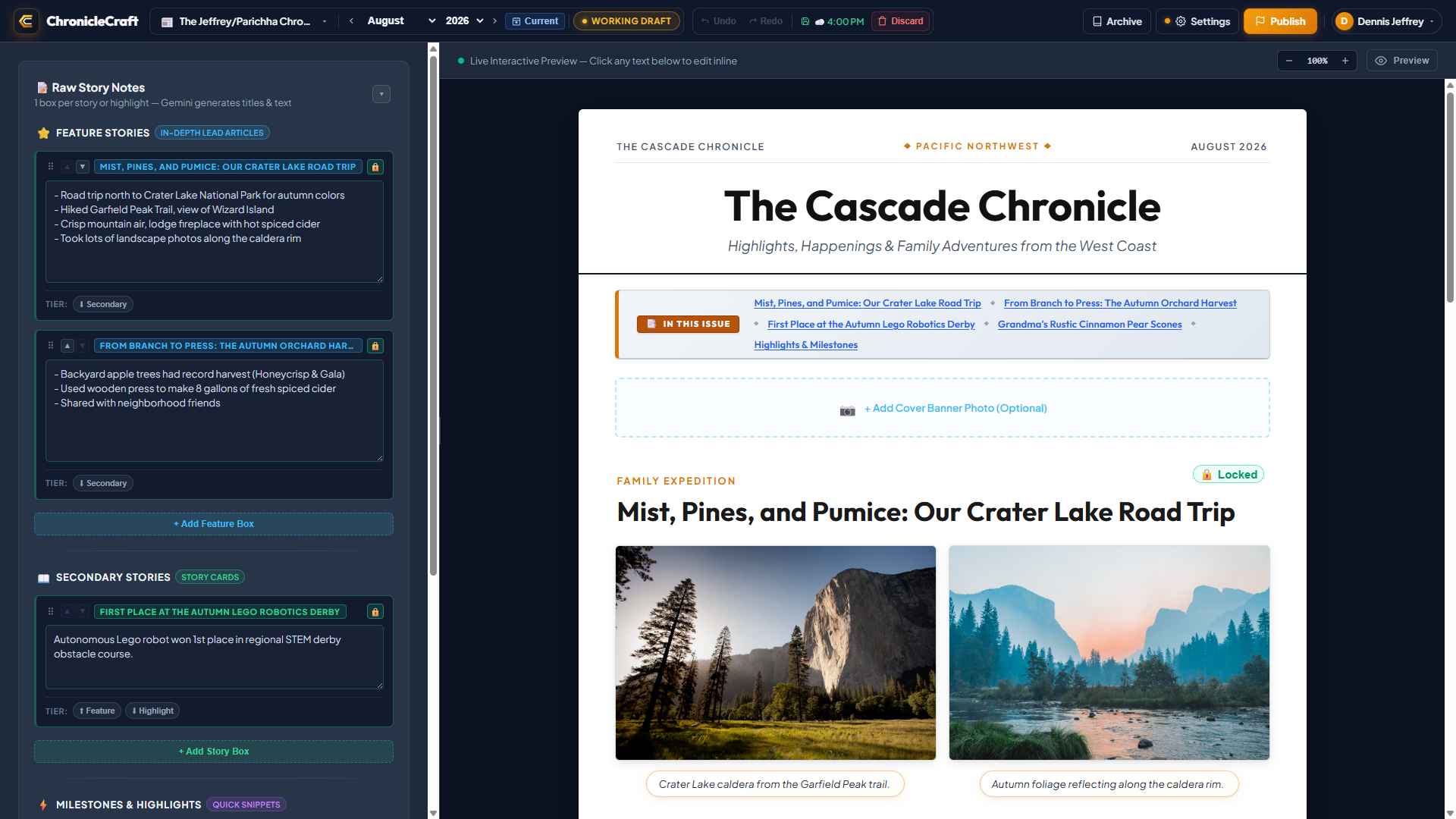
ChronicleCraft Studio • Active Workspace (August 2026 Issue)
ChronicleCraft Studio User Interface
← Left: Structured Story Notes, AI Spark, & Tier Classifiers Center/Right: Live Interactive Magazine Canvas & In-This-Issue Ribbon →
01 • Command & Control Bar

Unified Studio Navigation, Crafting Tools & Instant Compiler

The top command bar organizes the entire drafting lifecycle into three ergonomic capsules. The left cluster manages multi-publication scoping and instant month/year navigation with live Draft vs. Published status pills. The central cluster provides deep multi-level Undo/Redo history and debounced cloud autosaving (navigator.sendBeacon). The right cluster provides one-click access to the reader archive, Gemini settings with live connectivity status, and the one-click frozen static HTML compiler.


ChronicleCraft Studio Command Bar
Scope & Crafting Capsule (Left & Center) Publication Scope • Date Navigator • Undo/Redo Stack • Discard
Scope and Crafting Capsule Close-up
Actions & Publish Capsule (Right) Archive • Settings • Compiler
Publish and Action Capsule Close-up
02 • Editorial Scratchpad & AI

Structured Notes Drawer, Story Tiers & Gemini Collaboration

Stories begin as rough bullet points and memories. Authors can reorder boxes with drag handles, lock finished drafts with lock guards, and switch narrative tiers between Lead Features, Secondary Cards, and Snippets with a single click. Google Gemini drafts full prose on-demand without overriding manual touches.

  • Story Tiers: One-click promotion/demotion between Feature, Secondary & Highlight.
  • Lock Protection (isLocked): Shield polished copy against batch generative passes.
  • Reorder Handles: Effortless visual restructuring of the issue narrative flow.
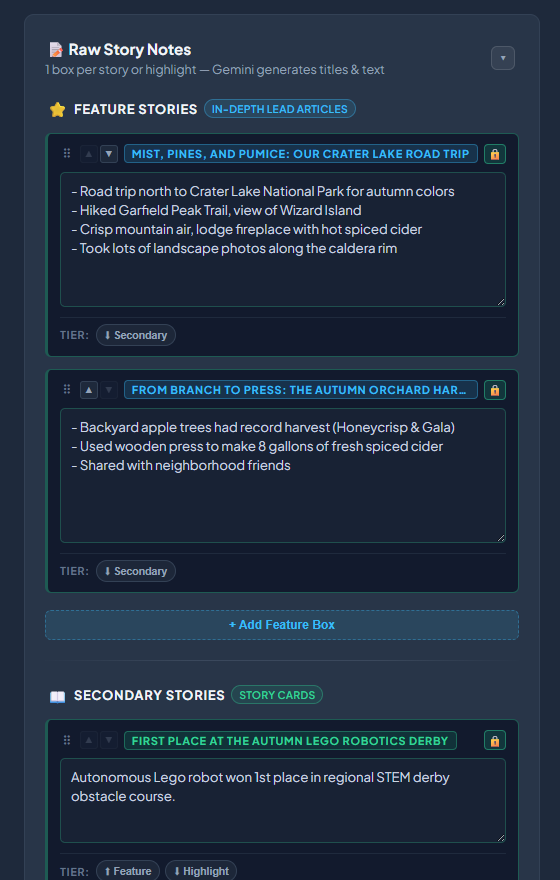
ChronicleCraft Raw Notes & Story Drawer
03 • Live Preview & Ticker

WYSIWYG Magazine Canvas & Interactive Ribbon Ticker

The right canvas displays the exact paper magazine layout with authentic Outfit and Plus Jakarta Sans typography. Click any headline or caption to edit inline. An automated horizontal "In This Issue" ribbon smoothly scrolls readers to story anchors with glowing highlights, while canvas zoom controls allow zooming from 50% to 150% scale.
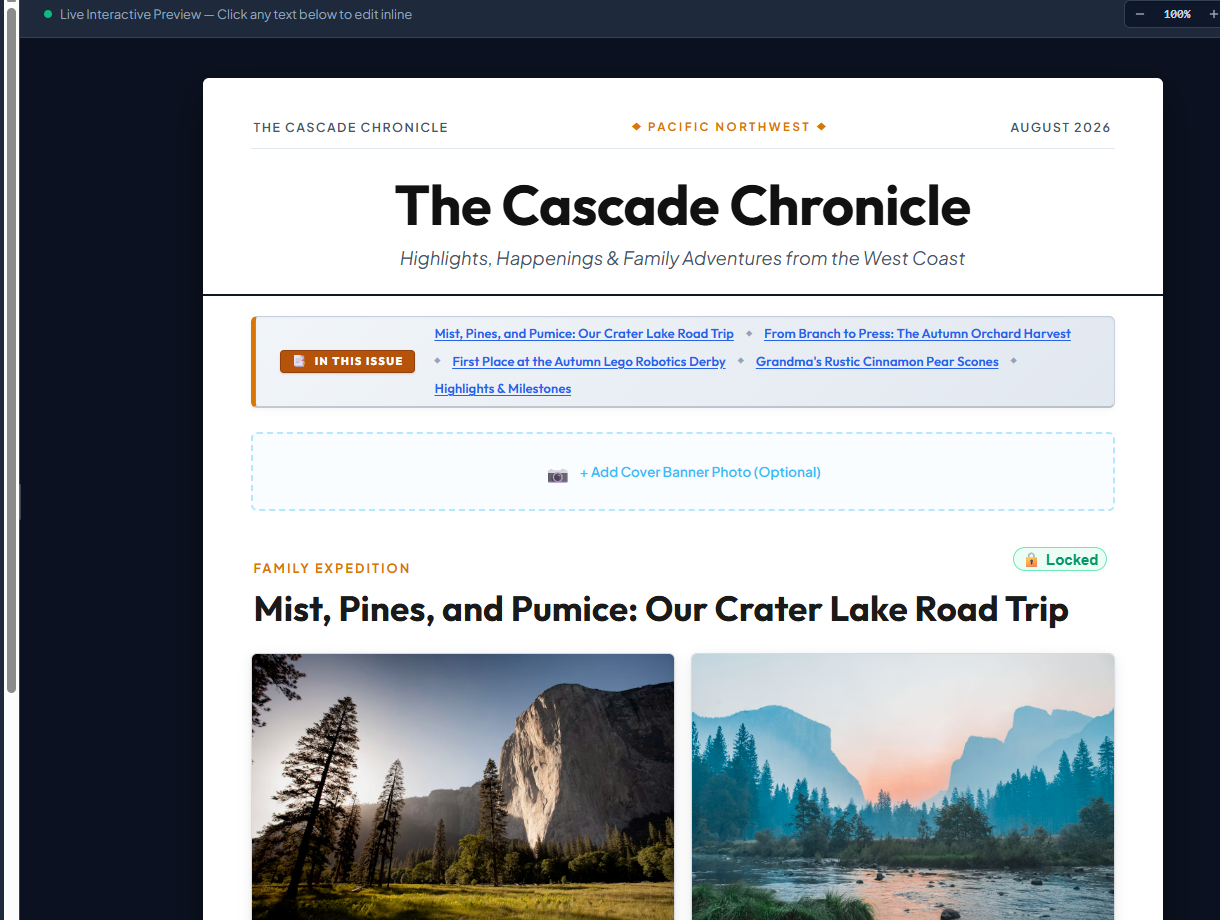
ChronicleCraft Live WYSIWYG Canvas
04 • Media Ingestion & Tray

Client-Side Canvas Compression & Populated Media Tray

Uploading modern multi-megabyte smartphone photos (10–20MB each) is instantaneous and bulletproof. The in-browser HTML5 canvas downsamples images to under 500KB before transmission, extracts EXIF orientation, and preserves layout aspect ratios. The dedicated media tray displays compression badges, live inline captions, "In Moments" filter counters, and one-click "Set as Hero" cover toggles.
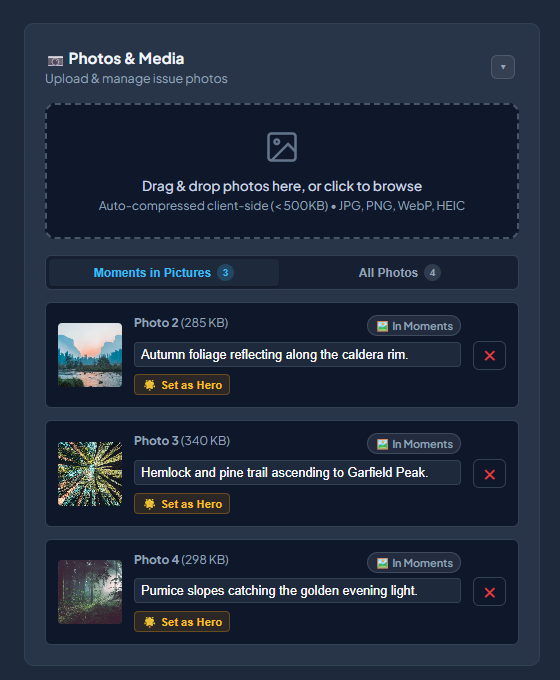
ChronicleCraft Populated Media Tray with Photo Cards

Architecture & Engineering

A look beneath the hood of a private, zero-database family publishing studio.

AI Collaboration • Subsystem 01

1. The "Memory Spark" & Lock-Aware Narrative Engine

Rather than replacing human authorship, ChronicleCraft treats Google Gemini as a collaborative muse. The author injects rough bullet points, milestones, and personal memories; Gemini drafts structured journalistic prose without ever overriding polished manual copy.

  • Explicit Triggering: Gemini API calls are initiated strictly on demand via the "✨ Spark Topic Ideas" or "🪄 Generate Stories" controls.
  • Strict Lock Guards (isLocked): Any story marked locked by the author is completely skipped during AI generation passes, guaranteeing that human edits are never overwritten.
  • Persona & Tone Calibration: Configurable temperature, system instructions, and multi-cut exploration ("5 Cuts") allow experimenting with humorous, concise, or nostalgic tones without leaving the canvas.
  • Rich Text Sanitization: Ingested AI markdown is parsed through a strict HTML sanitizer (DOMPurify / rich-text-sanitize.js) before mounting to the DOM.
gemini.js • Spark Pipeline
// Request Payload with Lock Guard
POST /v1beta/models/gemini-pro:generateContent
{
  "stories": notes.filter(n => !n.isLocked),
  "milestones": ["Derby 1st place", "Harvest"],
  "voice": "warm, editorial, conversational",
  "outputFormat": "structured_story_json"
}
uploader.js • Client Pipeline
// In-Browser Canvas Downsampler
const canvas = document.createElement('canvas');
const ctx = canvas.getContext('2d');
ctx.drawImage(rawImg, 0, 0, targetW, targetH);
const compressedBlob = await canvas.toBlob(
  'image/jpeg', 0.82
);
// Output: 14.8 MB → 312 KB (Zero Timeout)
Media Ingestion • Subsystem 02

2. Client-Side Canvas Compression & EXIF Ingestion

Modern mobile devices generate 10–20MB camera captures with proprietary HEIC metadata that can cripple web servers and crash PHP upload pipelines. ChronicleCraft solves this by executing lossless aspect scaling and compression entirely inside the reader's browser.

  • Client-Side Resampling: Canvas transforms images before transit, guaranteeing payloads under 500KB and eliminating PHP upload_max_filesize failures.
  • Universal Format Ingestion: Supports JPG, PNG, WebP, and in-browser HEIC/HEIF conversion using web workers.
  • Metadata Extraction: Computes true natural width/height aspect ratios (aspectRatio = width / height) on ingest for layout math.
  • Hero Cover Toggling: Instant one-click elevation of any uploaded photo to the magazine's top panoramic cover banner.
Layout Math • Subsystem 03

3. Dynamic Aspect-Ratio Photo Packing Engine

One of the greatest challenges in editorial magazine design is placing mixed portrait, landscape, and panoramic photos in a row without ugly letterbox bars or awkward white gaps. ChronicleCraft employs a flex-growth proportional layout engine.

  • Proportional Flex Weighting: CSS flex-grow is dynamically assigned based on each photo's aspect ratio (flex: {ratio} 1 0px).
  • Equal Height Harmonics: Every photo in an editorial row aligns to the exact same visual height while preserving 100% of its native frame without unwanted cropping.
  • Mixed Orientation Support: A 3:2 landscape (flex: 1.5) and a 2:3 portrait (flex: 0.67) sit seamlessly side-by-side with mathematically balanced column widths.
  • Responsive Mobile Stacking: Viewports below 680px automatically transition multi-photo rows into clean single-column cards with responsive image heights.
editor-photos.js • Packing Formula
// Flex Growth Calculation
const ratio = (img.width && img.height)
  ? (img.width / img.height).toFixed(3)
  : 1.5;

figure.style.flex = `${ratio} 1 0px`;
<!-- Zero gaps • Identical row heights -->
state-history.js • Undo/Redo
// Immutable State Snapshot
pushHistory() {
  const snapshot = JSON.parse(JSON.stringify({
    state: this.state,
    notes: this.draftNotes,
    images: ChronicleUploader.images
  }));
  this.undoStack.push(snapshot);
  this.redoStack = [];
}
State Architecture • Subsystem 04

4. Bi-Directional Sync, Cloud Autosave & Undo Stack

The studio features an uninterrupted pair-editing experience: typing into the left sidebar immediately updates the live magazine canvas, while editing text inline on the magazine canvas immediately reflects back into the structured story models.

  • Debounced Cloud Autosaving: Every keystroke triggers a debounced 1000ms timer that saves draft state silently to the server, updating the top command bar's save timestamp.
  • Beacon Persistence (sendBeacon): If the author accidentally closes the tab or navigates away, a background beacon call guarantees the working draft is saved without delay.
  • Deep Undo / Redo (Ctrl+Z / Ctrl+Y): A robust immutable history stack tracks up to 50 states across story mutations, milestone additions, and photo reorderings.
  • Draggable Canvas Zoom: A built-in canvas zoom controller (50% to 150%) allows inspecting the magazine at 100% paper scale or stepping back for a bird's-eye layout overview.
Archival Storage • Subsystem 05

5. Frozen Time Capsules & Zero-Database Compiling

Preserving family history shouldn't require maintaining a SQL database server that can crash or demand schema migrations in twenty years. ChronicleCraft's compiler packages every finalized issue into a 100% self-contained static HTML file.

  • CSS Autopacking: Bundles all modular theme stylesheets (theme-photos.css, theme-stories.css, theme-ticker.css, theme-print.css) directly into an internal <style> tag.
  • Decade-Proof Archival: Zero database calls at render time, zero backend PHP execution for readers, and zero framework rot. A published issue is truly permanent.
  • Built-In Reader Lightbox: Click any photo in the published issue to open a full-screen, high-res dark modal with live keyboard navigation (Esc to dismiss).
  • Interactive Ticker Ribbon: Generates a sticky navigation bar with chevron scroll buttons and animated anchor targeting (.story-target-highlight).
publisher.php • Frozen Capsule
// Standalone Output File
newsletters/pizzamanvr/cascade-chronicle/
└── august-2026.html  [100% Standalone]
    ├── Bundled Theme CSS (Outfit + Jakarta)
    ├── Modular Theme Rules (photos, ticker, print)
    ├── Interactive Lightbox JS Included
    ├── Sticky Ribbon Ticker Links
    └── Zero Database Calls at Render
theme-print.css • Media Engine
/* Print-Ready Paper Media Rules */
@media print {
  .web-actions-bar, .preview-toolbar,
  .ticker-track-wrap, .photo-lightbox-modal {
    display: none !important;
  }
  .lead-story, .story-card, .milestone-bar {
    break-inside: avoid !important;
    page-break-inside: avoid !important;
  }
}
Security & Print • Subsystem 06

6. Multi-Tenant Scoping, Role Security & Paper Media Sheet

Beyond a single-family editor, ChronicleCraft is built as a true multi-publication studio. Independent family branches, hobby clubs, and author personas each manage their own isolated publications, photo assets, and public issue catalogs.

  • Tenant & Publication Scoping: Each user has access to designated publications (newsletters/{user}/{publication}/) with scoped draft storage and media buckets.
  • Role-Based Access Control: Strict authentication differentiates between administrators (can provision accounts and manage publication contexts) and standard editors.
  • Native Physical Print Engine: Includes a production-tested @media print stylesheet that suppresses web navigation and reformats typography for paper reproduction.
  • Page-Break Avoidance: CSS break-inside: avoid rules prevent story cards, milestone boxes, or photo frames from awkwardly splitting across page boundaries.
Public Demonstration Issue

Experience the Magazine Reader

Explore a live sample issue compiled using ChronicleCraft's authentic frozen time capsule engine. Experience the typography, horizontal ticker ribbon, aspect-ratio photo packing, and full-screen lightbox modal in action.

Open Public Sample Issue

Family & Author Access

Private family tools and historical archives. Password required.

Launch ChronicleCraft Studio (Login)
